SwipeAchieve
Clean up your iPhone photos and videos with a swipe
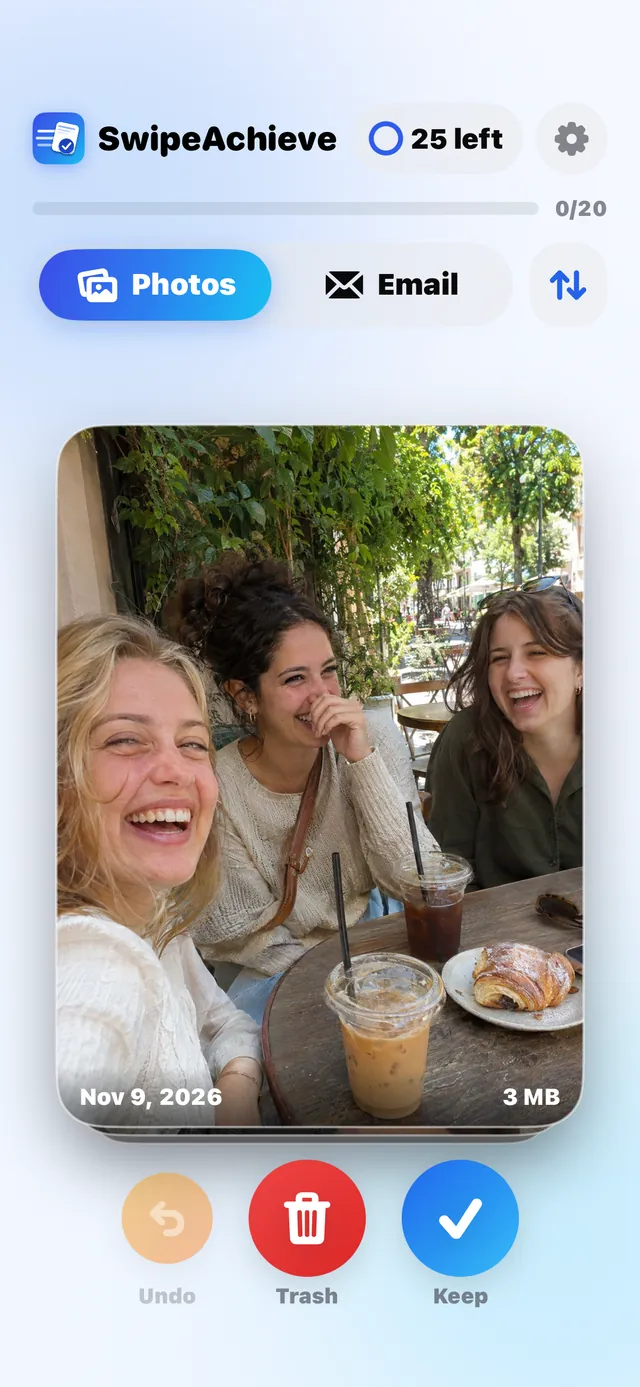
SwipeAchieve is a photo and video cleaner for iPhone. Swipe left to delete an item, swipe right to keep it, undo any swipe, and nothing is deleted until you confirm in the system prompt. Your photos never leave your phone.

How it works
- 1
Allow access to Photos
Photos and videos share one tab. Use the sort and filter menu to show only videos or the biggest files first. Your library stays on your iPhone.
- 2
Swipe left or right
Left deletes, right keeps. Cards show the date and size, and videos show their length. Tap Undo to reverse your last swipes.
- 3
Confirm once
Nothing is deleted until you confirm in the iPhone system prompt. Deleted items then stay in Recently Deleted for 30 days.
What it does and does not do
- Nothing is uploaded. Photos and videos are handled on your iPhone only.
- Nothing is deleted until you confirm in the system prompt. Deleted items stay in Recently Deleted for 30 days, so you can still get them back.
- It does not find duplicates automatically. You decide on each item yourself.
- SwipeAchieve counts the space freed by the items you clear. It does not read the storage of other apps.
Questions people ask
How do I free up iPhone storage by deleting photos?
Open SwipeAchieve and go through your photos one card at a time. Swipe left to delete, swipe right to keep. Space is fully reclaimed once the deleted items leave Recently Deleted.
Where do deleted photos go?
Deleted photos and videos go to Recently Deleted in your Photos app, where they stay for 30 days before they are removed for good.
How do I delete videos on iPhone?
In the Photos tab, open the sort and filter menu and choose Videos to see only videos, with their length and size on each card. Then swipe left on the ones you want to delete.
Does SwipeAchieve upload my photos?
No. Photos and videos are processed on your iPhone and are never uploaded.
Can I undo a swipe?
Yes. Tap Undo to reverse your last swipes. Nothing is deleted until you confirm in the system prompt.
Is this photo cleaner free?
You get 25 free swipes every day. SwipeAchieve Pro removes the limit, with 3 days free and then $2.99 per week or $29.99 per year.
More from SwipeAchieve
Ready to start swiping?