SwipeAchieve
Swipe your email inbox clean on iPhone
SwipeAchieve also cleans your email inbox one message at a time. Add an email account with IMAP and an app password, swipe left to move an email to your Trash folder, swipe right to keep it, and undo any swipe.

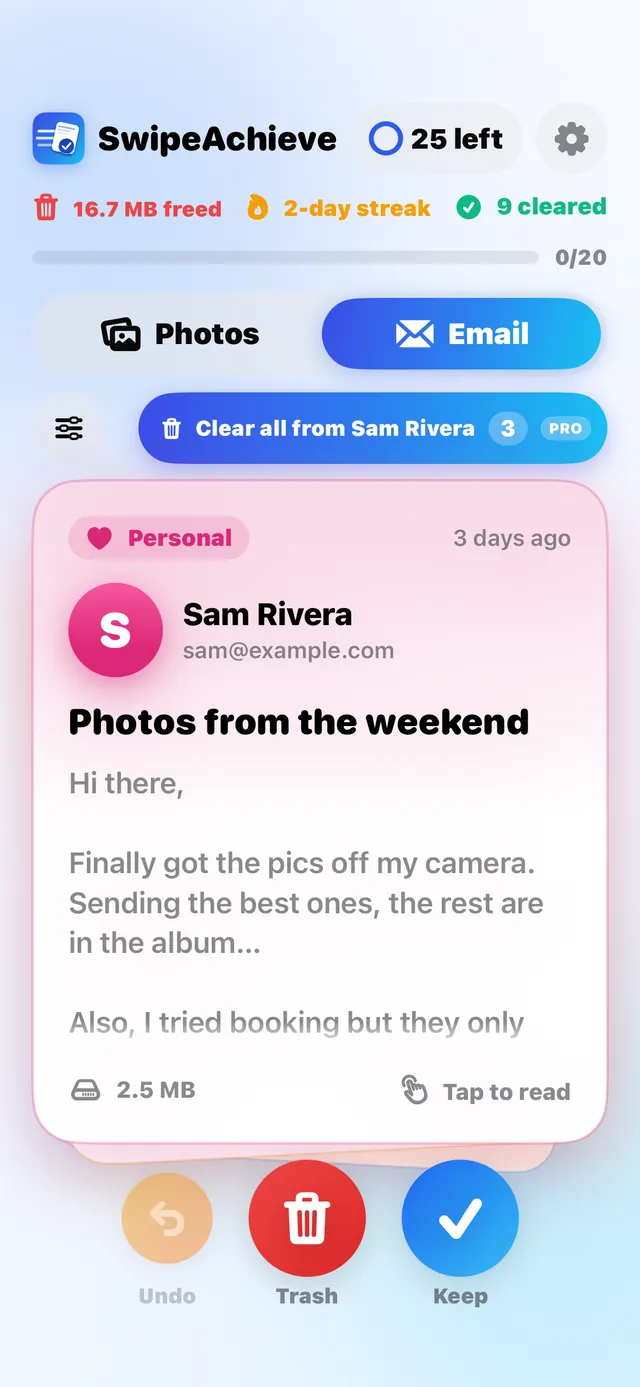
How it works
- 1
Add your account
Enter your address and an app password. It is saved in the iPhone Keychain and never sent to us.
- 2
Pick what to clean
Start with old mail, big messages or noisy senders, or work through your whole inbox.
- 3
Swipe left or right
Left moves the email to your Trash folder, right keeps it. Tap Undo to reverse your last swipes.
What it does and does not do
- Swiping left moves mail to your Trash folder. SwipeAchieve does not permanently delete email.
- Email uses IMAP with an app password, which most providers support. Sign-in with a provider account is not available yet.
- Your password is stored only in the iPhone Keychain, and mail is processed on your iPhone. SwipeAchieve has no servers that store your mail.
- It counts the space freed by the emails you trash. It does not measure your phone storage.
Questions people ask
How do I clean up my inbox on iPhone?
Add your email account in SwipeAchieve with an app password, then go through your inbox one card at a time. Swipe left to move an email to Trash, or swipe right to keep it.
What is an app password?
An app password is a separate password your email provider creates for one app, so you never share your normal password. You usually need to turn on two-step verification first, then create one named SwipeAchieve.
Does swiping delete my emails permanently?
No. Swiping left moves the email to your Trash folder, and you can tap Undo in the app or restore it from Trash in your mail app.
Can I bulk delete emails on iPhone?
In SwipeAchieve Pro, Sender Sweep moves everything from a noisy sender to Trash in one go. Everything else is one swipe at a time, with undo.
Is my email private?
Your password is stored in the iPhone Keychain and mail goes straight between your provider and your iPhone. SwipeAchieve has no mail servers that store your email.
Is this email cleaner free?
You get 25 free swipes every day. SwipeAchieve Pro removes the limit and adds Sender Sweep and smart sort. It starts with 3 days free, then $2.99 per week or $29.99 per year.
More from SwipeAchieve
Ready to start swiping?